
How to Automate Customer Support Without Building a Chatbot
Everyone builds a chatbot. 70% of support work is the ticket that should never have been opened. Here's the playbook I use with clients.

On this page
Every company that hits a support wall does the same thing. They add a chatbot. The chatbot disappoints customers, barely deflects tickets, and the support team is still drowning six months later.
I have watched this pattern play out enough times that when a client asks me to "build them a chatbot," my first question is: why? Then my second question is: have you actually looked at what is in your ticket queue?
Because 70% of the time, the answer is not "build a chatbot." It is something else entirely.
This post is the playbook I use with clients whose support is broken. It is the opposite of what most AI consultants will sell you.
The thing nobody says out loud
Most customer support tickets are not actually customer support tickets. They are symptoms of problems somewhere else in the business.
- The product has a confusing onboarding flow, so users write in asking "how do I do X."
- The pricing page is unclear, so users ask "does this include Y."
- The shipping policy is buried, so users write in asking about delivery dates.
- The product has a bug, so users report it over and over, each one eating 10 minutes of agent time.
A chatbot deflects these tickets at the symptom level. A better system prevents them at the source.
The framework I use
When a client asks me to reduce their support load, I run this process before any technology decision.
Step 1: Audit the last 500 tickets
Export the last 500 tickets from their helpdesk. Categorize each one:
- Product questions (how do I do X, where is feature Y)
- Policy questions (shipping, returns, refunds, pricing)
- Status requests (where is my order, when will X ship)
- Bug reports (something is broken)
- Account issues (I cannot log in, reset my password)
- Complaints (something went wrong, I am unhappy)
- Real one-off issues (unique situation that needs human judgment)
Tag each ticket. After 500 tickets, patterns emerge that are invisible when you read them one at a time.
Step 2: Find the top 5 categories
Usually 3 to 5 categories account for 80% of ticket volume. That is where the payoff is.
Step 3: For each top category, ask the right question
This is where most automation projects fail. They skip this step and go straight to "build an AI for it."
The right questions:
- For product questions: Should this information be more visible in the product? Can we add a tooltip, an empty state, a one-line help text where this question keeps arising?
- For policy questions: Is this policy easy to find? Is it written clearly? Could a short doc page on our site answer 90% of this?
- For status requests: Can we send a proactive notification that pre-empts this question? (Order shipped, tracking number, expected delivery.)
- For bug reports: What is the bug? Fix it. This is not automation; it is product work.
- For account issues: Self-serve flows. Most users asking "I cannot log in" need a better password reset UX, not a chatbot.
In 3 out of 5 top categories, the right answer is not automation. It is product or content work.
Step 4: What is left is automation candidates
Once you fix the preventable categories, what remains are usually:
- Status queries that need to be answered by looking up the user's actual data.
- Policy edge cases that a well-built doc system can handle.
- Repetitive factual questions that vary in wording but need the same answer.
These are the real targets for AI automation.
The actual AI system I build (not a chatbot)
For the cases that genuinely deserve AI, what I build is rarely a chatbot. More often it is something like this.
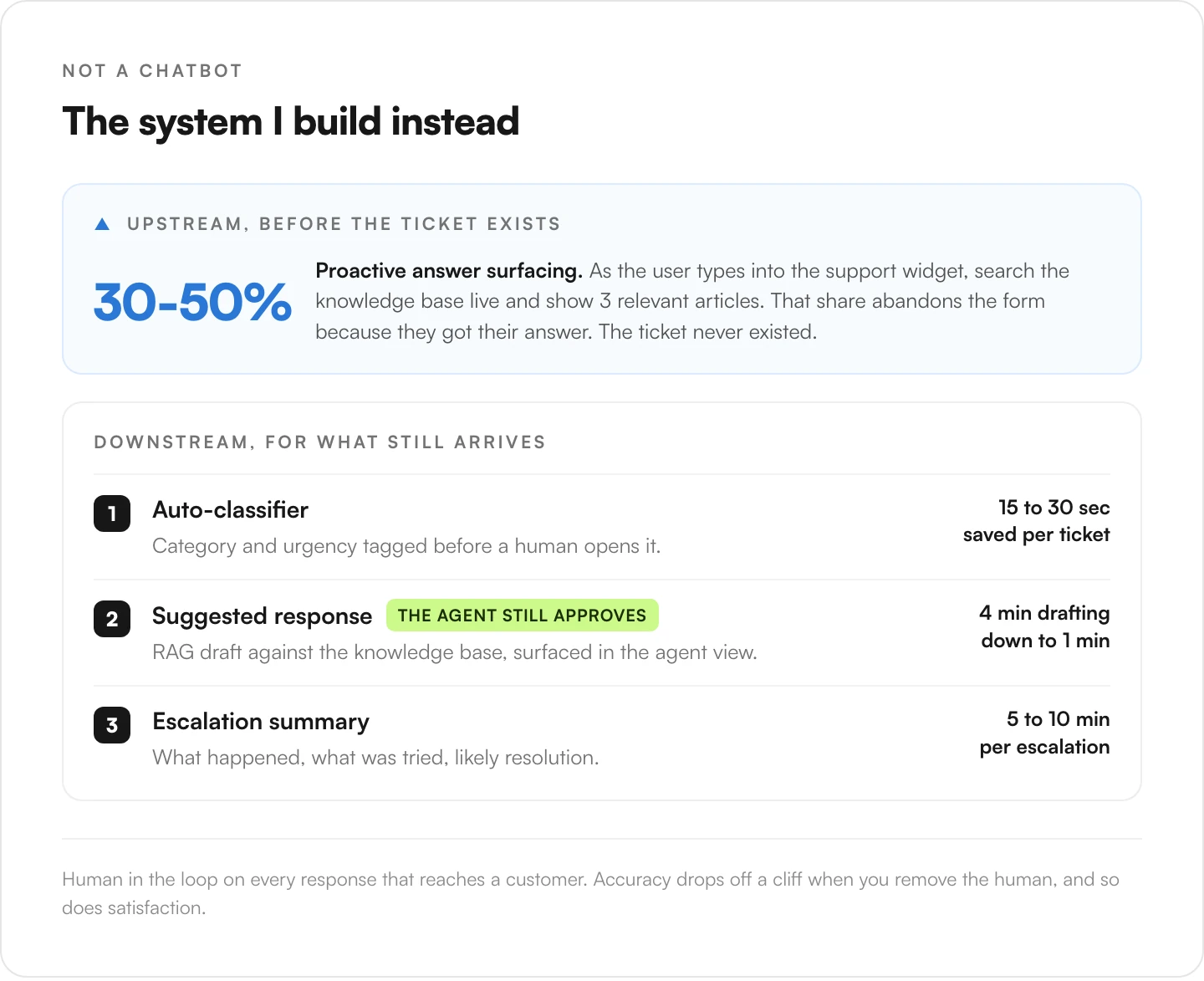
1. Auto-classifier on incoming tickets
Every new ticket gets classified by category and urgency before a human touches it. Uses a cheap LLM call, the small fast tier from whichever provider you already pay for, Claude Haiku being the one I reach for, with a prompt and the ticket content. Output: category tag + urgency score.
Saves 15 to 30 seconds per ticket of human triage. With 1,000 tickets a week, that is 4 to 8 hours saved on triage alone.
2. Suggested response generator (not automated response)
For the classifier-identified categories that have standard answers, generate a suggested response using RAG against your knowledge base. Surface it in the agent view so the human can approve, edit, or reject.
Key word: suggested. The agent still approves. Accuracy drops off a cliff when you remove the human, and so does customer satisfaction.
Typical result: agents go from drafting responses in 4 minutes to reviewing drafts in 1 minute. 75% time saved per ticket.
3. Proactive answer surfacing
Here is the part nobody builds and it is the most valuable.
Before a ticket is even submitted, when the user is typing their question into the support widget or contact form, use the draft text to search the knowledge base in real time. Show them 3 relevant articles inline: "This might answer your question." 30% to 50% of users abandon the form because they got their answer.
That is a deflected ticket that never existed. No chatbot needed.
4. Ticket-context summaries for complex cases
When a ticket gets escalated to a senior agent or is about to go to a manager, generate a summary: what happened, what was tried, what the user wants, what the likely resolution is. Saves 5-10 minutes per escalation.
The case study I keep telling
I built this system for a DTC e-commerce client. Their support was drowning. 2,500 tickets a week. Team of six. Response times were slipping past 48 hours.
The stated ask: "We want an AI chatbot on our site."
What I did instead:
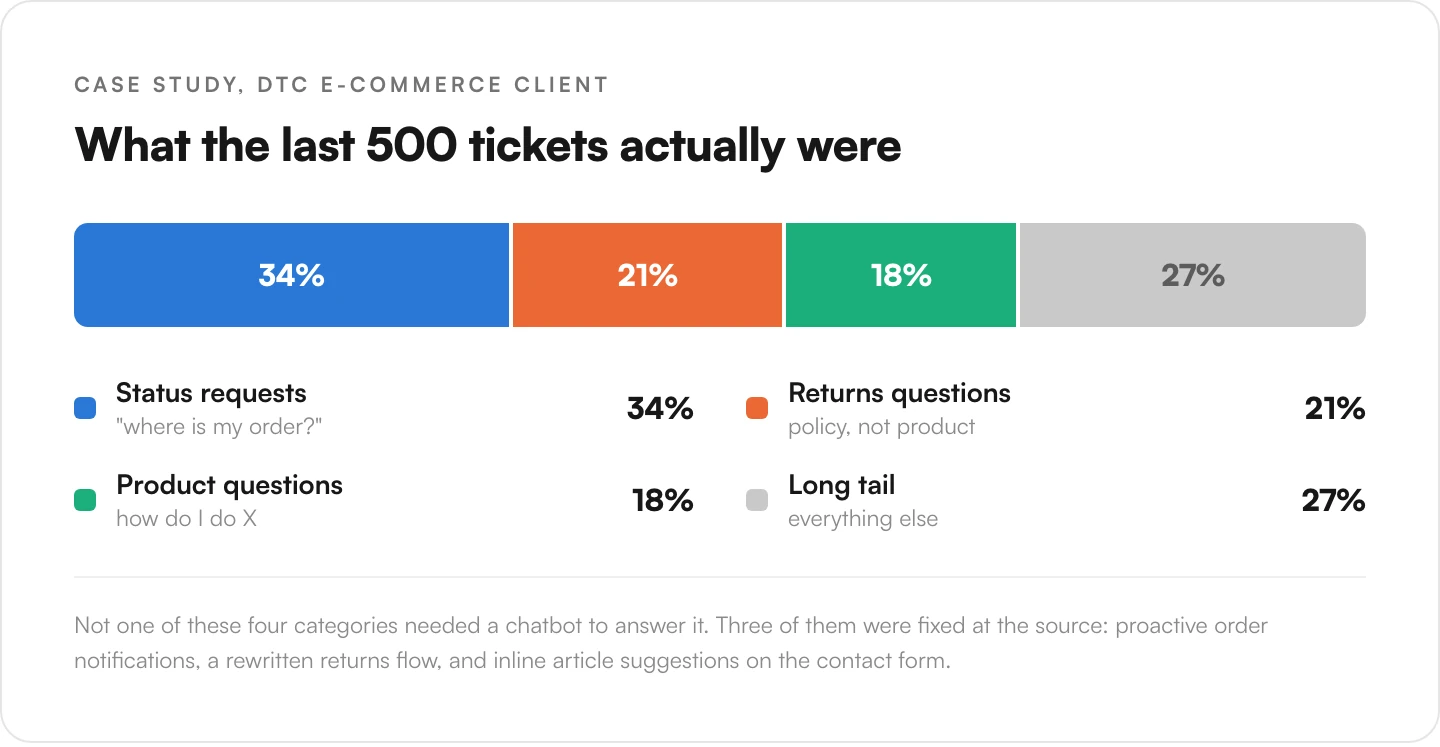
- Audited 500 tickets. Found 34% were status queries ("where is my order?"), 21% were returns questions, 18% were product questions, rest was long tail.
- Built proactive order notifications that cut status queries by 65%.
- Restructured the returns page. Added a self-serve returns flow. Dropped returns tickets by 40%.
- Added inline article suggestions on the contact form. Deflected another 25% of the remaining tickets.
- Built a classifier + draft generator for the queue that was left, giving agents suggested responses.
Net result over 90 days: 70% of tickets that would have hit the queue never arrived at all. The team handled the remaining 30% with faster response times. No chatbot was built.
That is the case study you see on my homepage. It is real. The numbers are real.
When a chatbot is actually the right answer
I am not against chatbots. Just against them being the default answer to everything.
A chatbot makes sense when:
- You have a product with genuinely complex self-serve questions (like developer tools where the user needs to look up API usage, syntax, integration instructions).
- Your users live in a chat UI anyway (like Slack-native apps where support lives in Slack).
- You have high-volume repeat questions with stable answers and your users prefer chat over reading docs.
- You have already fixed the product and content issues and the remaining volume is the long tail that benefits from conversational search.
Notice the "already fixed the product" part. Chatbot-as-last-step, not first-step.
The honest economic case
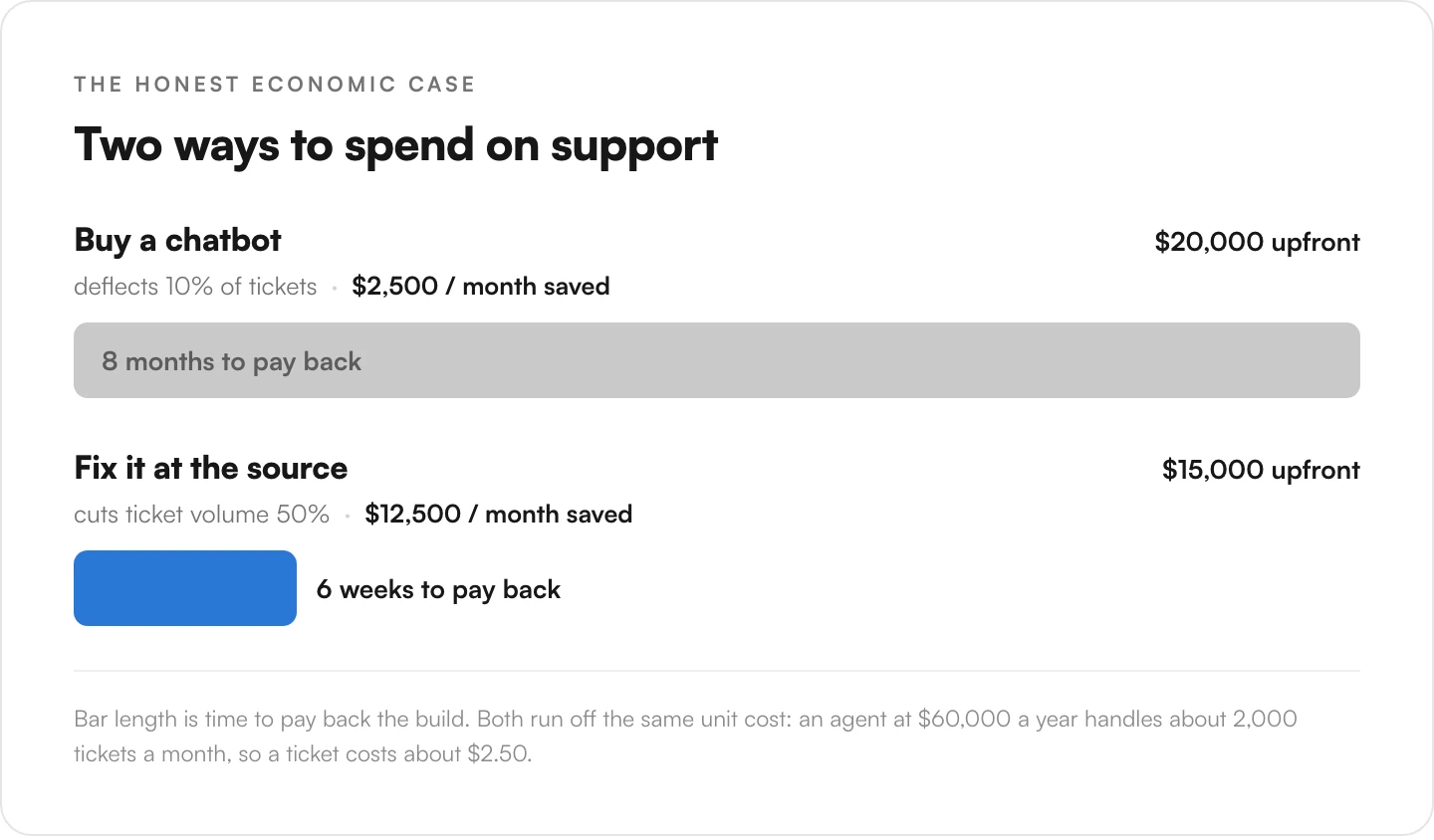
Every founder building a support system hits the same math eventually. An agent costs roughly $60,000/year all-in. Each agent handles about 2,000 tickets a month. That is $2.50 per ticket.
If you spend $20,000 on a chatbot and it deflects 10% of your tickets (optimistic for most chatbots), you save $2,500 per month. Payback in 8 months if the deflection rate holds.
If you instead spend $15,000 on ticket auditing + proactive notifications + self-serve flows + inline answer surfacing, and it reduces ticket volume by 50% (realistic for a messy support setup), you save $12,500 per month. Payback in 6 weeks.
The second option is harder to sell. It is not sexy. It does not have a dashboard that shows a little robot icon. But it is 5x more impactful.
The playbook summary
- Do not start with a chatbot. Start with 500 tickets in a spreadsheet.
- Find the top 3 categories. Look for patterns.
- Ask "is this a product problem?" first. Usually yes for most categories.
- Fix what you can at the source. Better copy, better flows, proactive notifications.
- Automate what is left with human-in-the-loop AI. Classifier + draft generator, not autonomous chatbot.
- Measure actual deflection, not vibes. Ticket volume over time, agent time per ticket, CSAT.
If you are drowning in support and thinking "we need a chatbot," take a step back. Maybe you do. Probably you do not. Probably you need someone to look at your ticket queue and tell you what is actually going on.
If you want that look, book a 25-minute call. I will ask you to export your last 500 tickets before the call. Come prepared. We will find at least one source-level fix worth way more than a chatbot would be.
Related reading: what is RAG and why most chatbots skip it, and the AI automation stack I use when automation is actually the right move.